The Scope mobile app
Your day.
Within reach.
Client details before the visit. The job history at the property. Your next step on the way out. Bring the workspace with you.
Public store links will appear here when available.
For now, we’ll help your team get access through a demo.
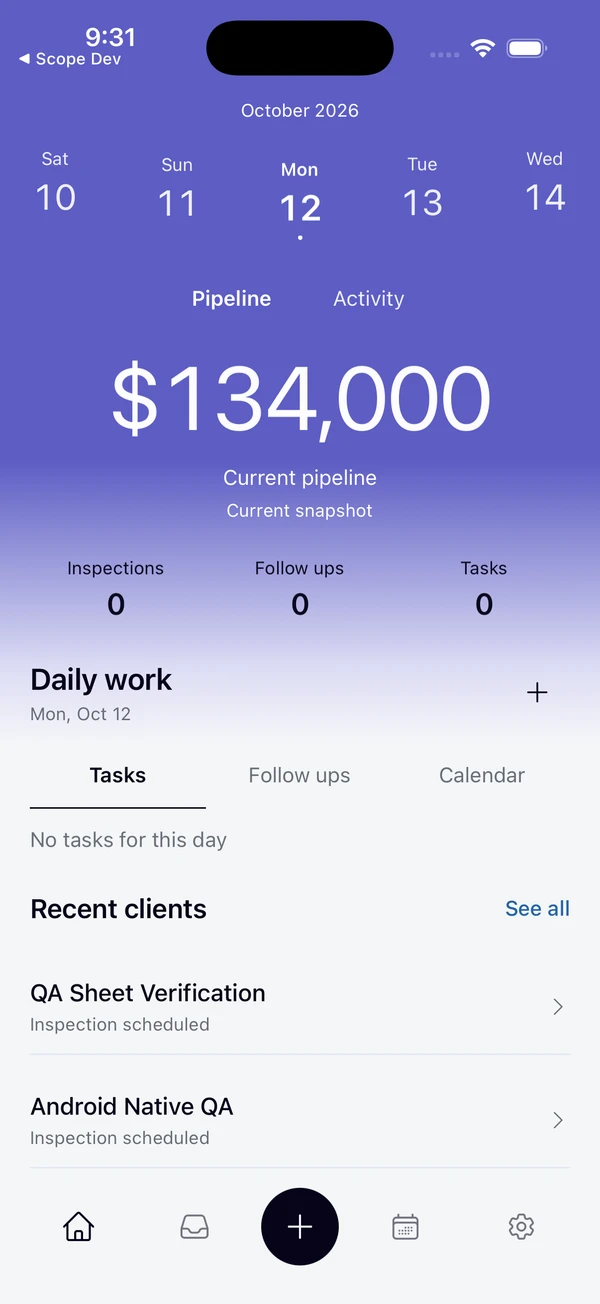
From the first stop to the last
A place for every part of your day.
- 01
Before you leave
Make a plan.
Review appointments, open tasks, and the follow ups that need your attention.
- 02
At the property
Know the client.
Find contacts, property details, and the history behind the conversation.
- 03
Between visits
Carry it forward.
Keep supported canvassing activity and field records connected to the client.
- 04
Back with the team
Keep the context.
Review findings, estimates, documents, and job details in the shared workspace.
Less signal.
Keep the context.
Previously loaded records and supported saved changes can stay on your device when service drops. The app shows sync status so you can see what still needs to reach the office.
- On this device
- Review records already loaded for your authorized account.
- Ready to reconnect
- Supported changes wait to sync. Reconnect to send them and review any changes needing attention.
- Online access
- A connection is required to sign in, download files, and open photos or documents.
Getting started
One account.
Your whole workspace.
- 1
See the field workflow
Book a demo to explore the app and discuss access for your team.
- 2
Join your company
Accept your email invitation and complete account setup.
- 3
Bring the day with you
Sign in to your authorized client records, appointments, and field tools.
Before you head out.
How do I get the mobile app?
Book a demo and we’ll help your team get started. Public store download links will appear here when the listings are available.
Do I need a separate mobile subscription?
Both Base and Pro include the mobile app and web workspace. Your company chooses one plan for its team.
Can I work without a connection?
Previously loaded records and supported saved changes can stay on your device. Sync resumes when your connection returns. Signing in, downloading files, and opening photos or documents require a connection.
How do I join my company’s workspace?
An owner or administrator invites you by email. Complete the invitation setup, then sign in to the mobile app with your account.
Does the app show every company record?
Your role and assignments determine what you can see and change. The app keeps your work scoped to your authorized company account.
Same company. Same client records.
See how the field app fits the rest of Scope.